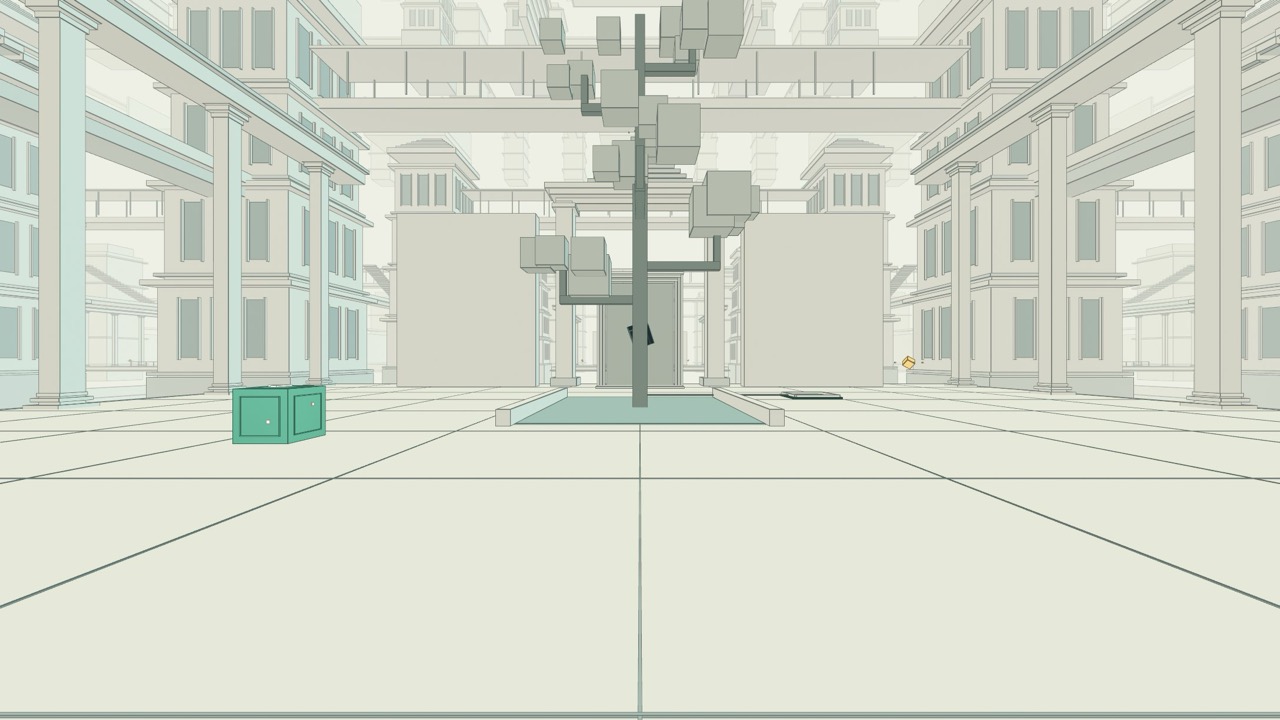
A calm 3D game of steady hands. A loose nut is threaded on a wire that climbs and dips, and you drag it home to a robot's socket, tilting the nut to follow every bend without touching the rail. Nine short levels in three chapters teach sliding, tilting and reading the camera one at a time, and each clean run earns three stars.
Ready Steady Hold is a small, calm 3D game about steady hands. A loose yellow nut sits on a stand at one end of a workbench, threaded on a steel wire that runs to a robot at the other end. You hold the nut, drag it along the wire and bring it home to the robot's socket, and the wire is never straight for long: it climbs, dips and crests, so the nut has to be tilted to follow each slope. A nut that is turned the wrong way will not go through, and one that scrapes the wire counts as a touch.
Each level is scored out of three stars by how many times you touch the wire: none earns all three, one or two earn two, three or more earn one. Nothing is lost by touching apart from the star. The nut stops, you let go, and the run carries on from the same place. There is no timer to beat, and the last course of the set says so in as many words.
It is by Chong-U (@chongdashu on X), who publishes it as number 002 on his AI Oriented Play hub and also on Wavedash. His hub says he has been making games for 20 years, that AI has made the process much faster, and that he shares how he makes each one. Neither this game's page nor its Wavedash page says which AI tools, if any, were used on this particular game, so we do not say either. The Wavedash page lists how it is built: Rust and WebAssembly, WebGPU rendering, and Blender models. The game does keep its physics in a small WebAssembly module, which is the part we could see.
How to play Ready Steady Hold
- The title screen offers Continue, New Game, Levels and Settings. New Game starts level 1, Straight Ahead: one flat wire and nothing to do but drag. The first three levels open with a short lesson card that you can step through or skip: Slide, then Tilt, then View. Levels are unlocked in order, each one when you finish the one before, and the Levels screen shows all nine with a small drawing of each wire, three little skill bars (Hold, Rotate, Camera) for how much each level asks of you, and the stars you have earned out of 27.
- Hold the left mouse button and drag: the nut follows the pointer, but only along the wire, so you steer it rather than place it. Let go and it stops. Before a slope, stop: until the nut is turned to match the wire's angle it jams against the rail, and no amount of pushing gets it through. Turn it with the mouse wheel, Q and E, or the tilt dial at the bottom (it goes about 74 degrees either way), then slide again. The rhythm the game teaches is: stop, tilt, slide, level out, tilt back for the way down.
- The scene is drawn from a slanted angle, so a wire that bends up and down can be hard to read. Right-drag to orbit the camera, Shift plus right-drag to pan, and use the View button for on-screen arrows and zoom, with a Reset view. Level 3 exists just to teach this: in its lesson the nut stays still while you turn the table. On the keyboard the left and right arrow keys (or A and D) slide the nut, but up and down push it off the wire, so they are a way to get into trouble rather than a control to lean on.
- When the nut reaches the socket the final twist happens by itself, a burst of sparks goes off at the robot and a result card gives your stars, your touches and your time, with FIXED! and, for a clean run, "Beautifully steady." From there you can go to the next level, try again or return to the title. Escape pauses at any time (Continue, Restart level, Settings, Title screen) and R restarts the level. If you leave in the middle of a level, Continue on the title screen puts the nut back exactly where it was.
- Settings has switches for Music, Sound effects and Screen shake (off by default if your device asks for reduced motion), a Replay all lessons button, and a choice of game style: Robot Rescue, the default, with the robot waiting at the end, or Classic, where a blue nut runs to an orange fixture and the result card says NAILED IT! instead of FIXED! Touch works the same way with fingers: one finger drags the nut, two fingers turn the camera, and the tilt dial and its two arrow buttons stand in for the wheel and Q and E.
Controls: Hold the left mouse button and drag to slide the nut along the wire; release to stop. Turn the nut to match each slope with the mouse wheel, Q and E, or the tilt dial and its two buttons (about 74 degrees either way). Right-drag orbits the camera, Shift plus right-drag pans, and the View button opens on-screen arrows for orbit, pan and zoom, with Reset view. The left and right arrow keys (or A and D) slide the nut too, but up and down (W and S) push it off the wire. Escape pauses, R restarts the level. On a touch screen: one finger drags the nut, two fingers orbit the camera.
Click Fullscreen above the game for the largest play area. If the game does not load, use Open in new tab to play it directly from our copy.
Why it's worth your time
Nine levels, in three chapters. First Steps is Straight Ahead, Bend & Mend and Find Your Angle. The Workshop is Double Dip, High & Low and The Grand Fix, with rolling hills and slopes that reach close to 60 degrees. Fine Work is Small Wonder, Close Quarters and The Finishing Touch, played with a compact nut whose smaller opening leaves less room for error. All nine wires are flat curves: the wire's points all sit in one vertical plane, so the difficulty is height and angle, and the camera turns the depth that a side-on view would hide. The author's hub and Wavedash page both still say six courses and eighteen stars. The game itself, as we copied it on 24 September 2026, has nine levels and 27 stars, so treat the six as out of date.
What a touch does. The nut freezes for an instant, sparks fly, the star row loses a star, a message tells you what to do next ("Rail touched. Release, then gently recenter.", or, if you are on a slope, to stop and adjust the tilt) and the counter at the top goes up. Where the browser allows it, a phone is asked to vibrate too. Nothing is reset and there is no game over. We saw it happen: our scripted player, which drags the nut with real pointer events, finished Bend & Mend with one touch for two stars and Double Dip with four touches for one star.
What we played and what we did not. We finished levels 1 to 4 on the live game with that script (levels 1 and 3 with no touches, level 2 with one, level 4 with four), repeated levels 1 and 2 on our copy, and completed level 1 with a real touch drag in an emulated phone. The script could not get past the first steep climb of level 5, so levels 5 to 9 we opened, looked at and moved the nut in, but did not finish, and we cannot tell you how hard the last chapter is. Its clock, in the runs we saw, read from under two seconds for the flat level to under seven for a hilly one, but that is a machine steering a nut, not a person.
Small, and made to run in a browser. The game is a single 950 KB script, a 75 KB WebAssembly module that does the physics, nine wire models of 100 to 150 KB each and a few more for the nut, the robot and the two ends, a 1.4 MB music loop and two Google fonts. Our copy is about 5 MB in 26 files and, once loaded, does not need the network. The sound effects (a blip when you start moving, a chime for each lesson step, a clank for a touch, a rising run of notes on docking and a short fanfare) are generated in the browser from the page's code; the music is the one audio file, and it starts on your first click or key press. We did not listen to any of it.
It needs WebGPU. There is no fallback to the older WebGL: if the browser cannot provide a WebGPU adapter the game stops at an error card ("We couldn't open the workshop.") with the reason underneath; we saw its message, "A WebGPU graphics adapter is unavailable on this device," in a browser that had no GPU access. A recent desktop Chrome or Edge is the safest bet. On our test Mac it ran at 60 frames a second, on desktop and in an emulated phone.
What we changed in our copy. It is the game as the author's hub embeds it, from ready-steady-hold.lim-chong-u.workers.dev, plus this site's standard mirror script; the fonts are stored with it. Two things beyond that. The game builds every file address as a path from the site's root, which breaks for the six 3D model files when the game lives in a folder, so we point that one helper at our folder. And when the game is opened anywhere except on a local address it sends anonymous play events (session start, level start and finish, wire touches, which controls were used, frame-rate summaries, with a random player number kept in your browser) to the author's own analytics service; we point that address at nowhere, so our copy does not send them. Your progress and settings stay in your browser under two keys, and that random number.
We found no licence and no public source repository for the game. Treat it as Chong-U's work, played here with his pages linked.
How it was made and where it lives
Hosted on the author's own page. The author publishes as chongdashu. Original: https://play.aioriented.dev/ready-steady-hold. The Play button above runs our own unmodified copy, so the game keeps working here if that page goes down — which on free hosting usually has nothing to do with the author. Nothing about the game itself is changed, and the original stays linked from every page.
If you like Ready Steady Hold, try these
More from the same author: RoboTennis, a bright arcade robot-tennis match against the computer. For another slow, hands-on puzzle where a steady touch matters more than speed, try Sunjing Puzzles, a set of burr locks and sliding-block boxes.
Frequently asked questions
- Do I need to install anything?
- No. It runs in the browser, but the browser has to support WebGPU: a recent Chrome, Edge or Safari on a device that supports it. Without WebGPU the game shows an error card instead of starting.
- What happens if I touch the wire?
- You lose a star and the nut stops for a moment. You let go, recentre and carry on from the same place. Nothing restarts and there is no game over. Zero touches is three stars, one or two is two stars, three or more is one star.
- How many levels are there?
- Nine, in three chapters, worth 27 stars in all, when we copied it on 24 September 2026. The author's own pages still say six courses and eighteen stars, from an earlier version. Each level unlocks when you finish the one before.
- Is there a time limit?
- No. The game shows how long a level took, but nothing is lost for being slow, and the last level's own hint says to take all the time you need.
- Does it work on a phone?
- It is built for touch as well as a mouse: one finger drags the nut, two fingers turn the camera, and an on-screen dial and two buttons tilt it. It ran cleanly in an emulated phone, but the phone must support WebGPU, the scene is small on a narrow screen, and we have not tried a real handset.
- Does it save my progress?
- Yes, in your browser: your best stars for each level, which levels are unlocked, your settings, and a checkpoint so that Continue returns you to a level you left half-way. Clearing the site's data erases them.
- Who made it, and with what?
- Chong-U (@chongdashu), on his AI Oriented Play hub, where it is number 002; it is also on Wavedash. His hub says AI has made his process much faster and that he shares how each game is made, but does not say what was used on this one, so we do not either. His Wavedash page says it is built with Rust and WebAssembly, WebGPU and Blender models.
- Is Ready Steady Hold free to play?
- Yes. Everything on Floating Arcade is free, with no account, ads or downloads.
- Can I embed this game on my own website?
- Yes — copy the snippet below. The embedded player links back here, which is how we ask to be credited.
Embed Ready Steady Hold on your site
Paste this where you want the game to appear: