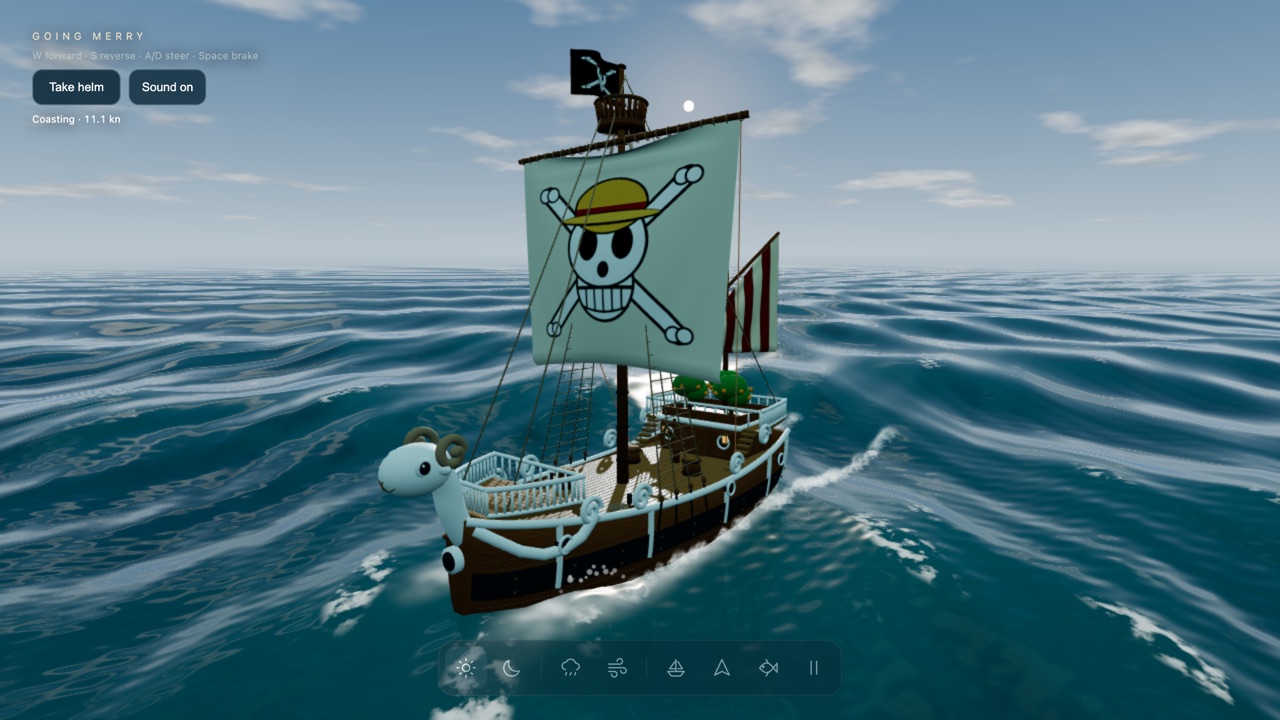
An unofficial One Piece fan piece: steer a 3D Going Merry across an endless simulated ocean, with wind you can set, day or night, rain, a wake that foams behind the hull, and a dive camera that goes under the waves. There are no islands and no goals; it is a ship and the sea.
Open Ocean is a small 3D sailing scene built around one ship: the Going Merry, the caravel from the One Piece manga and anime, drawn here with the Straw Hat skull on its sail and the ram figurehead at the bow. You get a wide ocean with rolling waves, a sun or a starry night, and controls that let you sail the ship for as long as you like. The creator, Yash (@yash_yk45), says in his post that he built it with GPT-6 Astra in Codex, with the ship modelled in Blender and the ocean written in Three.js and GLSL.
This is an unofficial fan piece and is not affiliated with or endorsed by the rights holders of One Piece. The page itself is titled only "Open Ocean", and the Going Merry name and the Straw Hat Pirates credit appear in its ship panel.
The catalogue that led us to it describes a sailing world, which might suggest islands to reach. There are none. The page's own source has a Drum Island button commented out, and the code that would place the island is set to nothing, so what is live is a ship on open water. We have marked it as a scene rather than a game because there is no goal, score or destination.
How to play Going Merry · Open Ocean
- The page opens on an orbit view of the ship, already drifting slowly. Drag to swing the camera round it and scroll to zoom. Press W and the Merry starts sailing on the default "Game · assisted" handling: W goes forward, S brakes and then reverses, A and D steer, Space brakes. We saw the speed climb to around 10 to 15 knots in a few seconds with the wind at its default setting.
- "Take helm" (top left) moves the camera behind the ship in a chase view. The ship panel (the sailboat icon in the bottom bar) adds four more views: an inspect orbit, a view from the wheel on the deck, a view from the figurehead, and a free camera. The deck view is the most convincing one: you look down the planks at the mast and the wheel while the sea rolls past.
- The bar along the bottom holds the rest. The sun and moon icons switch day and night, the cloud icon turns rain on and off, and the wind icon opens a slider from 0 to 17.6 metres per second. The last three buttons are Travel, Dive and Pause. Dive drops a free camera under the surface, looking up at the hull against the light, with a school of small fish nearby; it does not move the ship, so you will need Take helm to sail again afterwards. The little Sound button at the top toggles the sea sounds.
- The ship panel also holds a Manual sailing mode. In it, W and S raise and lower the sail, A and D move the helm, Q and E trim the yard, Z and X row on the port and starboard side, and sliders set the helm, sail, main yard, aft sail, wind direction and even a current. There is a Lower anchor button and a Reset ship button too. Manual sailing is a real physics model and is harder than it looks: in our test the ship crept along at about one knot with the helm hard over and its heading barely moved, because a rudder does little at that speed.
- On a phone the keys do not exist, so the ship panel becomes the steering wheel: tap Forward or Reverse and move the Helm slider. It works, and dragging the canvas orbits the camera, but the panel fills most of a small screen.
Controls: W forward, S brake and reverse, A/D steer, Space brake; Q/E trim the sail; Z/X row; drag to orbit the camera, scroll to zoom. The bottom bar switches day and night, rain, wind strength, ship controls, travel, dive and pause.
Click Fullscreen above the game for the largest play area. If the game does not load, use Open in new tab to play it directly from our copy.
Why it's worth your time
The water is the point. It is shaded per pixel with a reflected sky and foam on the crests, so it changes visibly between the calm default and the wind slider pushed to 17 metres per second, when whitecaps break across the swell. At speed the ship leaves a white wake with spray and bubbles behind the stern. On our test machine, which renders in software, the foam sprites looked blocky and pixelated at the edges; on real graphics hardware they may look cleaner, and we could not check that here.
Night is the most dramatic switch: stars, a black sea and the ship dim except for a warm glow at the stern. With rain on as well the scene is almost pitch dark, with thin rain streaks the only other thing to see. From reading the page's code, the sound (wind, wash, ripples, creaking) is synthesised in the browser rather than loaded from files, so there are no audio files to download. We could not listen to it in our test setup, so we cannot say how it sounds.
The download is small for what it is: about 9.8 MB in our mirrored copy, of which the ship model is 7 MB, the ocean mesh 2 MB and the fish about 0.5 MB. It runs at a steady 60 frames a second in the test browser at 1280 by 720.
The Going Merry, the skull flag and the setting belong to their rights holders. We have treated this as fan content and say so on the page. This entry was found through Tripo's GPT-6 Astra prompt collection; the creator's own post, quoted above, is the primary source.
How it was made and where it lives
Hosted on Vercel. The author publishes as yash_yk45. Original: https://one-piece-sea-world.vercel.app/. The Play button above runs our own unmodified copy, so the game keeps working here if that page goes down — which on free hosting usually has nothing to do with the author. Nothing about the game itself is changed, and the original stays linked from every page.
The post that led us here
Yash@yash_yk45Built a playable One Piece ocean world with GPT-6 Astra in Codex. Sail the Going Merry, change the weather, explore underwater, and see the ship create realistic spray, foam, bubbles, and wake effects.
If you like Going Merry · Open Ocean, try these
For another unofficial fan scene that is a place to wander rather than a game, try King Kai Planet. If you like watching a physical simulation run for its own sake, City Atlas and Infinite Garden are close in spirit.
Frequently asked questions
- Is this an official One Piece game?
- No. It is an unofficial fan piece by an independent creator and is not affiliated with or endorsed by the rights holders. If you are a rights holder and want it removed, the contact in the footer gets it done.
- Is there anything to reach or win?
- No. There are no islands, no missions and no score. You sail, change the weather and look around. The page's source has a Drum Island shortcut commented out, so an island may have been planned, but it is not in the live page.
- Who made it, and how?
- Yash, posting as @yash_yk45 on X. Per his post, it was built with GPT-6 Astra in Codex, using Blender and Python for the 3D models and Three.js, WebGL and GLSL for the ocean.
- How do I steer?
- On the default handling, W is forward, S brakes and reverses, and A and D steer. Turning works only while the ship is moving; at a crawl the helm does almost nothing. Manual sailing is harder and needs you to trim the sails yourself.
- Does it work on a phone?
- Yes, with limits. Open the ship panel with the sailboat button, then use its Forward, Reverse and Stop buttons and the Helm slider. It is playable but cramped, and there is no keyboard shortcut for anything. A desktop with a keyboard is much easier.
- How do I get under the water?
- Press the fish icon (Dive). The camera drops below the surface where you can see the hull from beneath and a school of small fish. The ship stops being under your control while you are in this view; press Take helm to go back.
- Is Going Merry · Open Ocean free to play?
- Yes. Everything on Floating Arcade is free, with no account, ads or downloads.
- Can I embed this game on my own website?
- Yes — copy the snippet below. The embedded player links back here, which is how we ask to be credited.
Embed Going Merry · Open Ocean on your site
Paste this where you want the game to appear: