15 animated, narrated children's books in five languages, on a 3D bookshelf with quizzes, progress tracking and collectible 3D souvenirs. Built with Fable 5.1 in three days. The first 3 books are free; the other 12 need a paid membership on the original site.
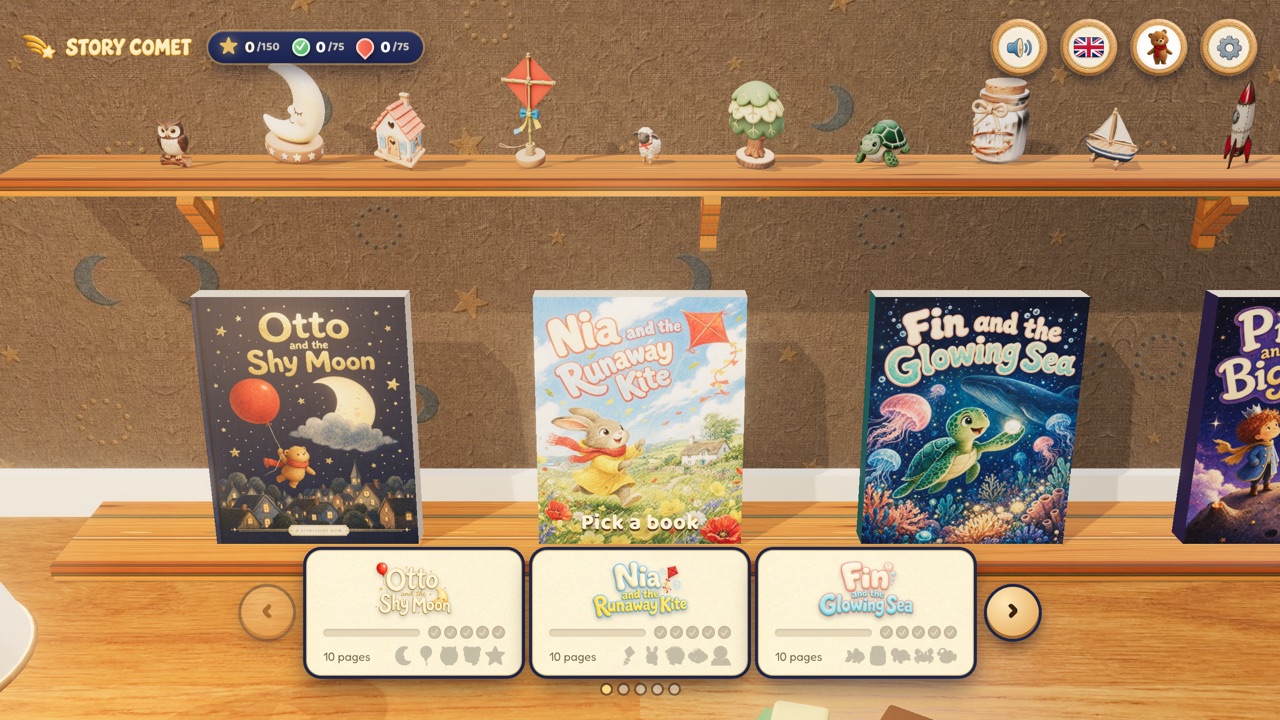
StoryComet is the one paid product in this collection, and it's here for the same reason everything else is: it's a striking piece of work made with an AI model in an unreasonably short amount of time, and worth knowing about even though we won't be hosting a copy of it. It's a shelf of animated, narrated children's books — 15 of them at launch, in English, Spanish, French, Japanese and Chinese — arranged on a warm, lamp-lit 3D bookshelf with a row of collectible souvenir models above it. Meng To built the whole thing with Fable 5.1 in three days, then spent a third day wiring up Supabase for accounts, Stripe for payment and a real domain.
The first three books — Otto and the Shy Moon, Nia and the Runaway Kite, and Fin and the Glowing Sea — are free to read in full, no account required; we confirmed that ourselves. The other 12 sit behind a paid membership. That's the author's business model, not ours: we take no cut and host nothing, we're just pointing at something we think is worth seeing.
The pitch, in the author's own words, is a language-learning read-aloud experience: six of the books teach English, Spanish, French, Japanese or Chinese, kids can take quizzes and collect pins and 3D souvenirs as they go, and parents get a progress view. We saw the bookshelf, the language switcher, and the progress counters (stars, checks, gems) firsthand; the quiz and voiceover mechanics are the author's own description of the paid books, which we haven't gone through ourselves.
How to play StoryComet
- Pick a book from the shelf — the carousel at the bottom shows a page count and a row of milestone badges for each one.
- The flag icon in the top bar switches the interface and story language; the speaker icon toggles narration.
- The bear icon opens your collected 3D souvenirs, earned by finishing books and quizzes. The gear icon holds settings and, for parents, progress tracking.
- The first three books need nothing else to open. Anything past that prompts you to sign in and subscribe, on StoryComet's own site — not here.
Why it's worth your time
It's genuinely fast work: a full three-day build (prototype, then nine more books plus languages/quizzes/pins/souvenirs, then polish and payments) for something with this much original art, five-language narration and a working subscription business behind it.
The site sets X-Frame-Options: DENY, so even if we wanted to embed it, the original wouldn't allow it — one more reason this is a link-out entry rather than a mirrored one.
The bookshelf and souvenir shelf both render as real 3D objects rather than flat illustrations, which is a more expensive choice than most children's-book apps make for what is, underneath, a page-turning reader.
How it was made and where it lives
Hosted on Netlify. The author publishes as MengTo. Original: https://storycomet.app. This is a paid product with its own accounts and billing, so we link to the original instead of hosting or embedding a copy — pay and play there.
The post that led us here
Meng To@MengToI built StoryComet with Fable 5.1 in three days. 15 animated children's books in five languages, with translated voiceovers, covers and UI.
If you like StoryComet, try these
For more of this collection's paid-or-notable-but-not-ours exceptions, see the site's own About page, which explains the labelling. For a free, offline, similarly polished piece of interactive art, try Vesper or Tavora.
Frequently asked questions
- Is StoryComet free?
- Partly. The first 3 of 15 books are free with no account. The rest need a paid membership ($39/year early-bird, standard $79) on the original site — we don't sell or host that membership.
- Why isn't this mirrored like everything else on the site?
- Two reasons: it's a real paid business with accounts and billing behind it, and its own hosting blocks embedding outright (X-Frame-Options: DENY). We link to it instead.
- Do I need an account for anything?
- Not for the three free books. Sign-in only comes up if you try to open one of the other 12.
- Who made it, and with what?
- Meng To (@MengTo), built with Fable 5.1 over three days — one day for a prototype, one for the remaining books and features, one for polish and payments.